The Main Event Loop
We now got comfortable using callbacks, but how do they actually work? All of this happens asynchronously, so there must be something managing the events and scheduling the responses. Unsurprisingly, this is called the main event loop.
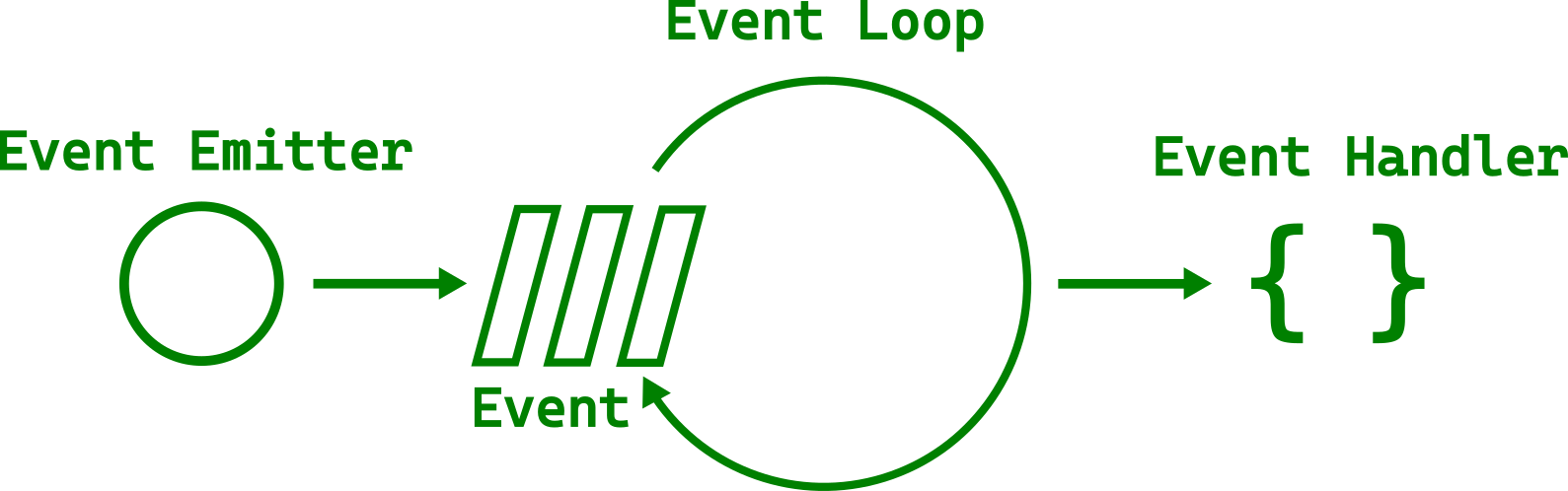
The main loop manages all kinds of events — from mouse clicks and keyboard presses to file events. It does all of that within the same thread. Quickly iterating between all tasks gives the illusion of parallelism. That is why you can move the window at the same time as a progress bar is growing.
However, you surely saw GUIs that became unresponsive, at least for a few seconds.
That happens when a single task takes too long.
The following example uses std::thread::sleep to represent a long-running task.
Filename: listings/main_event_loop/1/main.rs
use std::thread;
use std::time::Duration;

use gtk::prelude::*;
use gtk::{self, glib, Application, ApplicationWindow, Button};

const APP_ID: &str = "org.gtk_rs.MainEventLoop1";

fn main() -> glib::ExitCode {
    // Create a new application
    let app = Application::builder().application_id(APP_ID).build();

    // Connect to "activate" signal of `app`
    app.connect_activate(build_ui);

    // Run the application
    app.run()
}

fn build_ui(app: &Application) {
    // Create a button
    let button = Button::builder()
        .label("Press me!")
        .margin_top(12)
        .margin_bottom(12)
        .margin_start(12)
        .margin_end(12)
        .build();

    // Connect to "clicked" signal of `button`
    button.connect_clicked(move |_| {
        // GUI is blocked for 5 seconds after the button is pressed
        let five_seconds = Duration::from_secs(5);
        thread::sleep(five_seconds);
    });

    // Create a window
    let window = ApplicationWindow::builder()
        .application(app)
        .title("My GTK App")
        .child(&button)
        .build();

    // Present window
    window.present();
}
After we press the button, the GUI is completely frozen for five seconds.
We can't even move the window.
The sleep call is an artificial example,
but frequently, we want to run a slightly longer operation in one go.
How to Avoid Blocking the Main Loop
In order to avoid blocking the main loop, we can spawn a new task with gio::spawn_blocking and let the operation run on the thread pool.
Filename: listings/main_event_loop/2/main.rs
Now the GUI doesn't freeze when we press the button. However, nothing stops us from spawning as many tasks as we want at the same time. This is not necessarily what we want.
If you come from another language than Rust, you might be uncomfortable with the thought of running tasks in separate threads before even looking at other options. Luckily, Rust's safety guarantees allow you to stop worrying about the nasty bugs that concurrency tends to bring.
Channels
Typically, we want to keep track of the work in the task.
In our case, we don't want the user to spawn additional tasks while an existing one is still running.
In order to exchange information with the task we can create a channel with the crate async-channel.
Let's add it by executing the following in the terminal:
cargo add async-channel
We want to send a bool to inform, whether we want the button to react to clicks or not.
Since we send in a separate thread, we can use send_blocking.
But what about receiving?
Every time we get a message, we want to set the sensitivity of the button according to the bool we've received.
However, we don't want to block the main loop while waiting for a message to receive.
That is the whole point of the exercise after all!
We solve that problem by waiting for messages in an async block.
This async block is spawned on the glib main loop with spawn_future_local
See also
spawn_futurefor spawning async blocks on the main loop from outside the main thread.
Filename: listings/main_event_loop/3/main.rs
As you can see, spawning a task still doesn't freeze our user interface. However, now we can't spawn multiple tasks at the same time since the button becomes insensitive after the first task has been spawned. After the task is finished, the button becomes sensitive again.
What if the task is asynchronous by nature?
Let's try glib::timeout_future_seconds as representation for our task instead of std::thread::sleep.
It returns a std::future::Future, which means we can await on it within an async context.
The converted code looks and behaves very similar to the multithreaded code.
Filename: listings/main_event_loop/4/main.rs
Since we are single-threaded again, we can even get rid of the channel while achieving the same result.
Filename: listings/main_event_loop/5/main.rs
But why did we not do the same thing with our multithreaded example?
Simply because we would get this error message:
error[E0277]: `NonNull<GObject>` cannot be shared between threads safely

help: within `gtk4::Button`, the trait `Sync` is not implemented for `NonNull<GObject>`
After reference cycles we found the second disadvantage of GTK GObjects: They are not thread safe.
Embed blocking calls in an async context
We've seen in the previous snippets that spawning an async block or async future on the glib main loop can lead to more concise code than running tasks on separate threads.
Let's focus on a few more aspects that are interesting to know when running async functions with gtk-rs apps.
For a start, blocking functions can be embedded within an async context.
In the following listing, we want to execute a synchronous function that returns a boolean and takes ten seconds to run.
In order to integrate it in our async block, we run the function in a separate thread via spawn_blocking.
We can then get the return value of the function by calling await on the return value of spawn_blocking.
Filename: listings/main_event_loop/6/main.rs
Run async functions from external crates
Asynchronous functions from the glib ecosystem can always be spawned on the glib main loop.
Typically, crates depending on async-std or smol work as well.
Let us take ashpd for example which allows sandboxed applications to interact with the desktop.
Per default it depends on async-std.
We can add it to our dependencies by running the following command.
cargo add ashpd --features gtk4
You need to use a Linux desktop environment in order to run the following example locally.
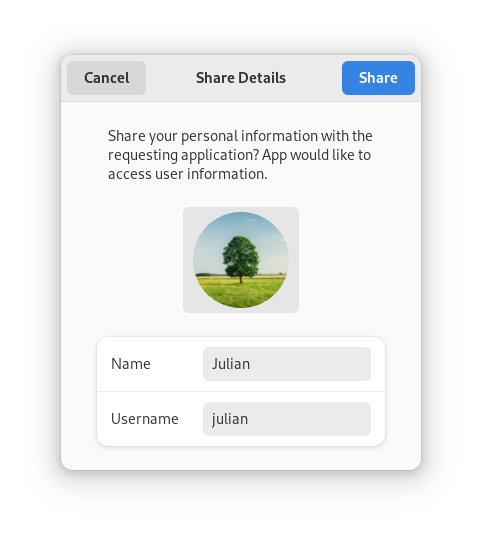
This example is using ashpd::desktop::account::UserInformation to access user information.
We are getting a gtk::Native object from our button, create a ashpd::WindowIdentifier and pass it to the user information request.
We need to pass the
WindowIdentifierto make the dialog modal. This means that it will be on top of the window and freezes the rest of the application from user input.
Filename: listings/main_event_loop/7/main.rs
After pressing the button, a dialog should open that shows the information that will be shared. If you decide to share it, you user name will be printed on the console.
Tokio
tokio is Rust's most popular asynchronous platform.
Therefore, many high-quality crates are part of its ecosystem.
The web client reqwest belongs to this group.
Let's add it by executing the following command
cargo add reqwest@0.11 --features rustls-tls --no-default-features
As soon as the button is pressed, we want to send a GET request to www.gtk-rs.org.
The response should then be sent to the main thread via a channel.
Filename: listings/main_event_loop/8/main.rs
This compiles fine and even seems to run. However, nothing happens when we press the button. Inspecting the console gives the following error message:
thread 'main' panicked at
'there is no reactor running, must be called from the context of a Tokio 1.x runtime'
At the time of writing, reqwest doesn't document this requirement.
Unfortunately, that is also the case for other libraries depending on tokio.
Let's bite the bullet and add tokio:
cargo add tokio@1 --features rt-multi-thread
Since we already run the glib main loop on our main thread, we don't want to run the tokio runtime there.
Let's bind it to a static variable and initialize it lazily.
Filename: listings/main_event_loop/9/main.rs
The button callback stays mostly the same.
However, we now spawn the async block with tokio rather than with glib.
Filename: listings/main_event_loop/9/main.rs
If we now press the button, we should find the following message in our console:
Status: 200 OK
We will not need tokio, reqwest or ashpd in the following chapters, so let's remove them again by executing:
cargo remove reqwest tokio ashpd
How to find out whether you can spawn an async task on the glib main loop?
glib should be able to spawn the task when the called functions come from libraries that either:
- come from the
glibecosystem, - don't depend on a runtime but only on the
futuresfamily of crates (futures-io,futures-coreetc), - depend on the
async-stdorsmolruntimes, or - have cargo features that let them depend on
async-std/smolinstead oftokio.
Conclusion
You don't want to block the main thread long enough that it is noticeable by the user.
But when should you spawn an async task, instead of spawning a task in a separate thread?
Let's go again through the different scenarios.
If the task spends its time calculating rather than waiting for a web response, it is CPU-bound. That means you have to run the task in a separate thread and let it send results back via a channel.
If your task is IO bound, the answer depends on the crates at your disposal and the type of work to be done.
- Light I/O work with functions from crates using
glib,smol,async-stdor thefuturestrait family can be spawned on the main loop. This way, you can often avoid synchronization via channels. - Heavy I/O work might still benefit from running in a separate thread / an async executor to avoid saturating the main loop. If you are unsure, benchmarking is advised.
If the best crate for the job relies on tokio, you will have to spawn it with the tokio runtime and communicate via channels.