The build process involves taking a set of source code files and some dependencies to produce an executable program file. The version of the program shown here uses the Fast and Light Toolkit ( available at fltk.org) and JsonCpp from GitHub. They must be available to build the program.
Makefile
The makefile contains all the steps necessary to translate the source code and dependencies into a program. The makefile is read by a program called make which executes the program building recipe represented by the file. The makefile for this process is shown further down. First, a word on dependencies.
Dependencies
The program builds on the Fast and Light Toolkit using a statically compiled version of FLTK by default. This statically compiled version must be available. The makefile listed here assumes you have built FLTK manually and not install it using a package manager. The FLTK documentation does a great job explaining how to build FLTK.
You also need a compiled version of JsonCpp.
Both JsonCpp and FLTK would exist at the root of your home directory as shown. The root directories for the FLTK code and JsonCpp would also include sub directories for relevant include files.
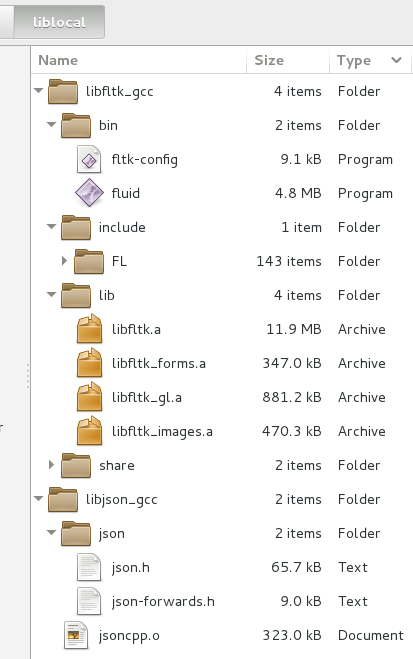
Source Code

The source code itself, when built using the makefile, resides as a sub directory of a source_code folder that also resides at the root of your home directory. The source code tree appears as follows.

The Makefile
The makefile was used in conjunction with the GNU G++ compiler. I chose that compiler as it is the default compiler on Linux. The compiler has proven to work very well in an iterative code modification scenario. Best of all, both the compiler and the make program are well documented such as the gcc manual and the manual for make.
| #Directories | |
| LIB_LOCAL_DIR := ../../../liblocal | |
| LIB_FLTK_DIR := $(LIB_LOCAL_DIR)/libfltk_gcc | |
| LIB_JSONCPP_DIR := $(LIB_LOCAL_DIR)/libjson_gcc | |
| SRC_DIR = ../src | |
| OBJ_DIR := obj | |
| LIB_DIR := lib | |
| #Includes | |
| INC_FLTK := $(LIB_FLTK_DIR)/include | |
| INC_JSON := $(LIB_JSONCPP_DIR) | |
| INC_SYS := $(LIB_LOCAL_DIR) | |
| #Compiler Exceptions | |
| INC_SYS_FLAGS := -isystem $(INC_SYS) -isystem $(INC_FLTK) -isystem $(INC_JSON) | |
| #Compiled Objects | |
| OBJ := $(OBJ_DIR)/jsoncpp.o $(OBJ_DIR)/gautier_visual_model.o $(OBJ_DIR)/gautier_visual_application_window.o $(OBJ_DIR)/gautier_program.o $(OBJ_DIR)/gautier.o | |
| #Libraries | |
| LIB_FLTK := $(LIB_FLTK_DIR)/lib/libfltk.a | |
| #Compiler parameters. Minimum standard. | |
| CPP_STD := -std=c++11 | |
| OPTO_PARAM := -O3 #full general optimization. Use this for released versions. | |
| #OPTO_PARAM := -Os #optimize to a small program size. Useful for comparison. | |
| #OPTO_PARAM := -g #full debugging. This should be default for testing and revision. | |
| CPP_MIN := $(OPTO_PARAM) $(CPP_STD) -Wpedantic -Wno-system-headers | |
| CPP_DBG := -fabi-version=0 -fcheck-new -fconstexpr-depth=512 -ffor-scope -fstrict-aliasing -fstrict-overflow -fvisibility-inlines-hidden -Wabi -Wall -Wcast-align -Wcast-qual -Wconversion -Wconversion-null -Wctor-dtor-privacy -Wdelete-non-virtual-dtor -Wdouble-promotion -Weffc++ -Wextra -Wfloat-equal -Wformat=2 -Wliteral-suffix -Wnarrowing -Wnoexcept -Wno-non-template-friend -Wno-unused-function -Wnon-virtual-dtor -Wno-pmf-conversions -Wold-style-cast -Woverloaded-virtual -Wreorder -Wshadow -Wsign-promo -Wstrict-aliasing=3 -Wstrict-null-sentinel -Wstrict-overflow=5 -Wsuggest-attribute=const -Wsuggest-attribute=noreturn -Wuseless-cast | |
| #Builders | |
| CPP_COMPILE := $(CPP_MIN) -c $(CPP_DBG) | |
| CPP_LINK := $(CXX) $(CPP_STD) $(OPTO_PARAM) | |
| #Linker parameters | |
| LIB_LINK := $(LIB_FLTK) `$(LIB_FLTK_DIR)/bin/fltk-config --ldstaticflags` | |
| #---------------------------------------------------------------------------------------------START | |
| #Build the program | |
| gautier : $(OBJ) | |
| $(CPP_LINK) -L$(LIB_FLTK_DIR)/lib -o $@ $(OBJ) $(LIB_LINK) | |
| #at this stage in the project, all should compile if any header change | |
| #beyond that, object files should change if its implementation changes. | |
| #Build the object files | |
| $(OBJ_DIR)/gautier.o: $(SRC_DIR)/main.cxx \ | |
| $(SRC_DIR)/gautier_program.hxx \ | |
| $(SRC_DIR)/gautier_visual_model.hxx \ | |
| $(SRC_DIR)/gautier_visual_application_window.hxx | |
| $(CXX) $(CPP_COMPILE) -I$(INC_FLTK) $(INC_SYS_FLAGS) -o $@ $< | |
| $(OBJ_DIR)/gautier_program.o: $(SRC_DIR)/gautier_program.cxx \ | |
| $(SRC_DIR)/gautier_program.hxx \ | |
| $(SRC_DIR)/gautier_visual_model.hxx \ | |
| $(SRC_DIR)/gautier_visual_application_window.hxx | |
| $(CXX) $(CPP_COMPILE) -I$(INC_FLTK) -I$(INC_JSON) $(INC_SYS_FLAGS) -o $@ $< | |
| $(OBJ_DIR)/gautier_visual_application_window.o: $(SRC_DIR)/gautier_visual_application_window.cxx \ | |
| $(SRC_DIR)/gautier_program.hxx \ | |
| $(SRC_DIR)/gautier_visual_model.hxx \ | |
| $(SRC_DIR)/gautier_visual_application_window.hxx | |
| $(CXX) $(CPP_COMPILE) -I$(INC_FLTK) $(INC_SYS_FLAGS) -o $@ $< | |
| $(OBJ_DIR)/gautier_visual_model.o: $(SRC_DIR)/gautier_visual_model.cxx \ | |
| $(SRC_DIR)/gautier_program.hxx \ | |
| $(SRC_DIR)/gautier_visual_model.hxx \ | |
| $(SRC_DIR)/gautier_visual_application_window.hxx | |
| $(CXX) $(CPP_COMPILE) -I$(INC_FLTK) $(INC_SYS_FLAGS) -o $@ $< | |
| $(OBJ_DIR)/jsoncpp.o : infrastructure_build | |
| cp --update $(LIB_JSONCPP_DIR)/jsoncpp.o $(OBJ_DIR)/ | |
| touch ../src/main.cxx | |
| #Setup prerequisite directories and files. | |
| infrastructure_build: $(LIB_FLTK) $(LIB_JSONCPP_DIR)/jsoncpp.o | |
| mkdir -p $(OBJ_DIR) | |
| .PHONY : clean | |
| clean : | |
| rm -r obj/ | |
| rm gautier_* | |
| rm *~ | |
| touch : | |
| touch ../src/*.hxx | |
| touch ../src/main.cxx | |
| #---------------------------------------------------------------------------------------------END | |
| #Licensed under the Apache License, Version 2.0 (the "License"); you may not use this file except in compliance with the License. You may obtain a copy of the License at http://www.apache.org/licenses/LICENSE-2.0 . Software distributed under the License is distributed on an "AS IS" BASIS, NO WARRANTIES OR CONDITIONS OF ANY KIND, explicit or implicit. See the License for details on permissions and limitations. |
 by
by Entering the Make Command
Any output from an earlier run of make was deleted prior to listing the directory contents. It shows nothing is available other than the makefile. The make command is entered and when enter is pressed, the make will read the file name Makefile and execute the build commands within the file.
An SSH session into CentOS

An SSH session into Xubuntu

Build Output
After executing make and compiling the program, the program file is shown using a directory listing. The obj directory is not material to running the file. It contains intermediate files used for creating the final executable program file. While it can be deleted, it mainly exists to speed up subsequent runs of make to skip rebuilding parts of the program whose code did not change.
An SSH session into CentOS

An SSH session into Xubuntu

Program Dependencies
Running readelf is a good way to see the run time requirements for the program. Since the program uses FLTK and C++ STL, the requirements list is very short and very standard. Most of these dependencies would exist in in most Linux distributions. The list would look very different for Apple Mac OS and Microsoft Windows (neither of which I have handy at the moment). What is generally means is the program can be built with this makefile as configured to produce an program file that runs on most distributions of 64-bit Linux as of this writing. It is a step in the right direction.
An SSH session into CentOS

An SSH session into Xubuntu

The side by side screenshots show only slight differences in the output using the same process in both operating systems. The high level information on this process is described on page 7 of the series, Compact Structured C++ Code with FLTK.