In this tutorial I will explain how to build Java REST web-service to upload files from any client over HTTP.
Uploading files to web-apps is a common task nowadays. A lot of services support uploading pictures or documents on their sites. With Java web services this is easy accomplished. What we need aside form the java web container (provided by your application server like Tomcat, GlassFish or JBoss) is the jersey framework to make it run. First I will show you how to implement the web-service and than give you two examples of clients to use the service.
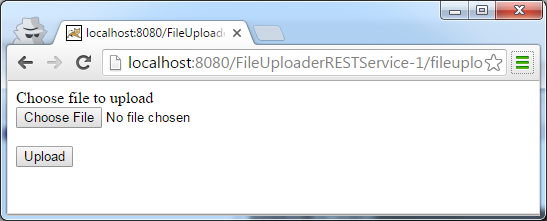
Java file upload form
Building the File Upload REST Service
The file is pushed over HTTP POST with encoding type “multipart/form-data” from the client to our web-service. This way you can add multiple parameters to the POST request in addition to the file. Lets start with the requirements. You will need an web/application server like Tomcat, GlassFish or JBoss to deploy the service. In addition we will use jersey framework to build our service endpoint. Please note, GlassFish 4.x version requires jersey version 2 libraries, so if you are using GlassFish 4 use jersey 2.x dependencies in your POM file instead.
For quick reference you can find the entire project in our GitHub repository under https://github.com/JavaTutorialNetwork/Tutorials/tree/master/FileUploaderRESTService
I will post the entire POM file here, but what you need to take into account are the jersey dependencies
<project xmlns="http://maven.apache.org/POM/4.0.0" xmlns:xsi="http://www.w3.org/2001/XMLSchema-instance"
	xsi:schemaLocation="http://maven.apache.org/POM/4.0.0 http://maven.apache.org/xsd/maven-4.0.0.xsd">
	<modelVersion>4.0.0</modelVersion>

	<groupId>net.javatutorial.tutorials</groupId>
	<artifactId>FileUploaderRESTService</artifactId>
	<version>1</version>
	<packaging>war</packaging>

	<name>File Uploader Rest Service</name>
	<url>https://javatutorial.net</url>

	<properties>
		<project.build.sourceEncoding>UTF-8</project.build.sourceEncoding>
	</properties>

	<dependencies>
		<dependency>
			<groupId>com.sun.jersey</groupId>
			<artifactId>jersey-server</artifactId>
			<version>1.8</version>
		</dependency>
		<dependency>
			<groupId>com.sun.jersey</groupId>
			<artifactId>jersey-servlet</artifactId>
			<version>1.17.1</version>
		</dependency>
		<dependency>
			<groupId>com.sun.jersey</groupId>
			<artifactId>jersey-json</artifactId>
			<version>1.8</version>
		</dependency>
		<dependency>
			<groupId>com.sun.jersey.contribs</groupId>
			<artifactId>jersey-multipart</artifactId>
			<version>1.8</version>
		</dependency>
	</dependencies>

	<build>
		<plugins>
			<plugin>
				<groupId>org.apache.maven.plugins</groupId>
				<artifactId>maven-compiler-plugin</artifactId>
				<version>3.1</version>
				<inherited>true</inherited>
				<configuration>
					<source>1.7</source>
					<target>1.7</target>
				</configuration>
			</plugin>
			<plugin>
				<artifactId>maven-war-plugin</artifactId>
				<version>2.3</version>
				<configuration>
					<webXml>src/main/webapp/WEB-INF/web.xml</webXml>
					<webResources>
						<resource>
							<!-- this is relative to the pom.xml directory -->
							<directory>${project.basedir}/src/main/resources
							</directory>
						</resource>
					</webResources>
				</configuration>
			</plugin>
		</plugins>
	</build>

</project>- <project xmlns="http://maven.apache.org/POM/4.0.0" xmlns:xsi="http://www.w3.org/2001/XMLSchema-instance"
- xsi:schemaLocation="http://maven.apache.org/POM/4.0.0 http://maven.apache.org/xsd/maven-4.0.0.xsd">
- <modelVersion>4.0.0</modelVersion>
- <groupId>net.javatutorial.tutorials</groupId>
- <artifactId>FileUploaderRESTService</artifactId>
- <version>1</version>
- <packaging>war</packaging>
- <name>File Uploader Rest Service</name>
- <url>https://javatutorial.net</url>
- <properties>
- <project.build.sourceEncoding>UTF-8</project.build.sourceEncoding>
- </properties>
- <dependencies>
- <dependency>
- <groupId>com.sun.jersey</groupId>
- <artifactId>jersey-server</artifactId>
- <version>1.8</version>
- </dependency>
- <dependency>
- <groupId>com.sun.jersey</groupId>
- <artifactId>jersey-servlet</artifactId>
- <version>1.17.1</version>
- </dependency>
- <dependency>
- <groupId>com.sun.jersey</groupId>
- <artifactId>jersey-json</artifactId>
- <version>1.8</version>
- </dependency>
- <dependency>
- <groupId>com.sun.jersey.contribs</groupId>
- <artifactId>jersey-multipart</artifactId>
- <version>1.8</version>
- </dependency>
- </dependencies>
- <build>
- <plugins>
- <plugin>
- <groupId>org.apache.maven.plugins</groupId>
- <artifactId>maven-compiler-plugin</artifactId>
- <version>3.1</version>
- <inherited>true</inherited>
- <configuration>
- <source>1.7</source>
- <target>1.7</target>
- </configuration>
- </plugin>
- <plugin>
- <artifactId>maven-war-plugin</artifactId>
- <version>2.3</version>
- <configuration>
- <webXml>src/main/webapp/WEB-INF/web.xml</webXml>
- <webResources>
- <resource>
- <!-- this is relative to the pom.xml directory -->
- <directory>${project.basedir}/src/main/resources
- </directory>
- </resource>
- </webResources>
- </configuration>
- </plugin>
- </plugins>
- </build>
- </project>
<project xmlns="http://maven.apache.org/POM/4.0.0" xmlns:xsi="http://www.w3.org/2001/XMLSchema-instance"
	xsi:schemaLocation="http://maven.apache.org/POM/4.0.0 http://maven.apache.org/xsd/maven-4.0.0.xsd">
	<modelVersion>4.0.0</modelVersion>

	<groupId>net.javatutorial.tutorials</groupId>
	<artifactId>FileUploaderRESTService</artifactId>
	<version>1</version>
	<packaging>war</packaging>

	<name>File Uploader Rest Service</name>
	<url>https://javatutorial.net</url>

	<properties>
		<project.build.sourceEncoding>UTF-8</project.build.sourceEncoding>
	</properties>

	<dependencies>
		<dependency>
			<groupId>com.sun.jersey</groupId>
			<artifactId>jersey-server</artifactId>
			<version>1.8</version>
		</dependency>
		<dependency>
			<groupId>com.sun.jersey</groupId>
			<artifactId>jersey-servlet</artifactId>
			<version>1.17.1</version>
		</dependency>
		<dependency>
			<groupId>com.sun.jersey</groupId>
			<artifactId>jersey-json</artifactId>
			<version>1.8</version>
		</dependency>
		<dependency>
			<groupId>com.sun.jersey.contribs</groupId>
			<artifactId>jersey-multipart</artifactId>
			<version>1.8</version>
		</dependency>
	</dependencies>

	<build>
		<plugins>
			<plugin>
				<groupId>org.apache.maven.plugins</groupId>
				<artifactId>maven-compiler-plugin</artifactId>
				<version>3.1</version>
				<inherited>true</inherited>
				<configuration>
					<source>1.7</source>
					<target>1.7</target>
				</configuration>
			</plugin>
			<plugin>
				<artifactId>maven-war-plugin</artifactId>
				<version>2.3</version>
				<configuration>
					<webXml>src/main/webapp/WEB-INF/web.xml</webXml>
					<webResources>
						<resource>
							<!-- this is relative to the pom.xml directory -->
							<directory>${project.basedir}/src/main/resources
							</directory>
						</resource>
					</webResources>
				</configuration>
			</plugin>
		</plugins>
	</build>

</project>
Having all necessary libraries now, lets go ahead and implement the REST service. There are several places in the code below I want to point your attention to. First note the usage of @Consumes(MediaType.MULTIPART_FORM_DATA) as requested encoding type. Second you may want to add additional parameters to the method if you like. For example you may want to pass some description or another text data with your upload. Finally Java will throw an Exception if you try to upload a file into a directory which not exists. To avoid this issue I created the method createFolderIfNotExists(String dirName).
package net.javatutorial.tutorials.services;

import java.io.File;
import java.io.FileOutputStream;
import java.io.IOException;
import java.io.InputStream;
import java.io.OutputStream;

import javax.ws.rs.Consumes;
import javax.ws.rs.POST;
import javax.ws.rs.Path;
import javax.ws.rs.core.Context;
import javax.ws.rs.core.MediaType;
import javax.ws.rs.core.Response;
import javax.ws.rs.core.UriInfo;

import com.sun.jersey.core.header.FormDataContentDisposition;
import com.sun.jersey.multipart.FormDataParam;

/**
 * This example shows how to build Java REST web-service to upload files
 * accepting POST requests with encoding type "multipart/form-data". For more
 * details please read the full tutorial on
 * https://javatutorial.net/java-file-upload-rest-service
 *
 * @author javatutorial.net
 */
@Path("/upload")
public class FileUploadService {

	/** The path to the folder where we want to store the uploaded files */
	private static final String UPLOAD_FOLDER = "c:/uploadedFiles/";

	public FileUploadService() {
	}

	@Context
	private UriInfo context;

	/**
	 * Returns text response to caller containing uploaded file location
	 *
	 * @return error response in case of missing parameters an internal
	 *         exception or success response if file has been stored
	 *         successfully
	 */
	@POST
	@Consumes(MediaType.MULTIPART_FORM_DATA)
	public Response uploadFile(
			@FormDataParam("file") InputStream uploadedInputStream,
			@FormDataParam("file") FormDataContentDisposition fileDetail) {

		// check if all form parameters are provided
		if (uploadedInputStream == null || fileDetail == null)
			return Response.status(400).entity("Invalid form data").build();

		// create our destination folder, if it not exists
		try {
			createFolderIfNotExists(UPLOAD_FOLDER);
		} catch (SecurityException se) {
			return Response.status(500)
					.entity("Can not create destination folder on server")
					.build();
		}

		String uploadedFileLocation = UPLOAD_FOLDER + fileDetail.getFileName();
		try {
			saveToFile(uploadedInputStream, uploadedFileLocation);
		} catch (IOException e) {
			return Response.status(500).entity("Can not save file").build();
		}

		return Response.status(200)
				.entity("File saved to " + uploadedFileLocation).build();
	}

	/**
	 * Utility method to save InputStream data to target location/file
	 *
	 * @param inStream
	 *            - InputStream to be saved
	 * @param target
	 *            - full path to destination file
	 */
	private void saveToFile(InputStream inStream, String target)
			throws IOException {
		OutputStream out = null;
		int read = 0;
		byte[] bytes = new byte[1024];

		out = new FileOutputStream(new File(target));
		while ((read = inStream.read(bytes)) != -1) {
			out.write(bytes, 0, read);
		}
		out.flush();
		out.close();
	}

	/**
	 * Creates a folder to desired location if it not already exists
	 *
	 * @param dirName
	 *            - full path to the folder
	 * @throws SecurityException
	 *             - in case you don't have permission to create the folder
	 */
	private void createFolderIfNotExists(String dirName)
			throws SecurityException {
		File theDir = new File(dirName);
		if (!theDir.exists()) {
			theDir.mkdir();
		}
	}

}
- package net.javatutorial.tutorials.services;
- import java.io.File;
- import java.io.FileOutputStream;
- import java.io.IOException;
- import java.io.InputStream;
- import java.io.OutputStream;
- import javax.ws.rs.Consumes;
- import javax.ws.rs.POST;
- import javax.ws.rs.Path;
- import javax.ws.rs.core.Context;
- import javax.ws.rs.core.MediaType;
- import javax.ws.rs.core.Response;
- import javax.ws.rs.core.UriInfo;
- import com.sun.jersey.core.header.FormDataContentDisposition;
- import com.sun.jersey.multipart.FormDataParam;
- /**
- * This example shows how to build Java REST web-service to upload files
- * accepting POST requests with encoding type "multipart/form-data". For more
- * details please read the full tutorial on
- * https://javatutorial.net/java-file-upload-rest-service
- *
- * @author javatutorial.net
- */
- @Path("/upload")
- public class FileUploadService {
- /** The path to the folder where we want to store the uploaded files */
- private static final String UPLOAD_FOLDER = "c:/uploadedFiles/";
- public FileUploadService() {
- }
- @Context
- private UriInfo context;
- /**
- * Returns text response to caller containing uploaded file location
- *
- * @return error response in case of missing parameters an internal
- * exception or success response if file has been stored
- * successfully
- */
- @POST
- @Consumes(MediaType.MULTIPART_FORM_DATA)
- public Response uploadFile(
- @FormDataParam("file") InputStream uploadedInputStream,
- @FormDataParam("file") FormDataContentDisposition fileDetail) {
- // check if all form parameters are provided
- if (uploadedInputStream == null || fileDetail == null)
- return Response.status(400).entity("Invalid form data").build();
- // create our destination folder, if it not exists
- try {
- createFolderIfNotExists(UPLOAD_FOLDER);
- } catch (SecurityException se) {
- return Response.status(500)
- .entity("Can not create destination folder on server")
- .build();
- }
- String uploadedFileLocation = UPLOAD_FOLDER + fileDetail.getFileName();
- try {
- saveToFile(uploadedInputStream, uploadedFileLocation);
- } catch (IOException e) {
- return Response.status(500).entity("Can not save file").build();
- }
- return Response.status(200)
- .entity("File saved to " + uploadedFileLocation).build();
- }
- /**
- * Utility method to save InputStream data to target location/file
- *
- * @param inStream
- * - InputStream to be saved
- * @param target
- * - full path to destination file
- */
- private void saveToFile(InputStream inStream, String target)
- throws IOException {
- OutputStream out = null;
- int read = 0;
- byte[] bytes = new byte[1024];
- out = new FileOutputStream(new File(target));
- while ((read = inStream.read(bytes)) != -1) {
- out.write(bytes, 0, read);
- }
- out.flush();
- out.close();
- }
- /**
- * Creates a folder to desired location if it not already exists
- *
- * @param dirName
- * - full path to the folder
- * @throws SecurityException
- * - in case you don't have permission to create the folder
- */
- private void createFolderIfNotExists(String dirName)
- throws SecurityException {
- File theDir = new File(dirName);
- if (!theDir.exists()) {
- theDir.mkdir();
- }
- }
- }
package net.javatutorial.tutorials.services;

import java.io.File;
import java.io.FileOutputStream;
import java.io.IOException;
import java.io.InputStream;
import java.io.OutputStream;

import javax.ws.rs.Consumes;
import javax.ws.rs.POST;
import javax.ws.rs.Path;
import javax.ws.rs.core.Context;
import javax.ws.rs.core.MediaType;
import javax.ws.rs.core.Response;
import javax.ws.rs.core.UriInfo;

import com.sun.jersey.core.header.FormDataContentDisposition;
import com.sun.jersey.multipart.FormDataParam;

/**
 * This example shows how to build Java REST web-service to upload files
 * accepting POST requests with encoding type "multipart/form-data". For more
 * details please read the full tutorial on
 * https://javatutorial.net/java-file-upload-rest-service
 *
 * @author javatutorial.net
 */
@Path("/upload")
public class FileUploadService {

	/** The path to the folder where we want to store the uploaded files */
	private static final String UPLOAD_FOLDER = "c:/uploadedFiles/";

	public FileUploadService() {
	}

	@Context
	private UriInfo context;

	/**
	 * Returns text response to caller containing uploaded file location
	 *
	 * @return error response in case of missing parameters an internal
	 *         exception or success response if file has been stored
	 *         successfully
	 */
	@POST
	@Consumes(MediaType.MULTIPART_FORM_DATA)
	public Response uploadFile(
			@FormDataParam("file") InputStream uploadedInputStream,
			@FormDataParam("file") FormDataContentDisposition fileDetail) {

		// check if all form parameters are provided
		if (uploadedInputStream == null || fileDetail == null)
			return Response.status(400).entity("Invalid form data").build();

		// create our destination folder, if it not exists
		try {
			createFolderIfNotExists(UPLOAD_FOLDER);
		} catch (SecurityException se) {
			return Response.status(500)
					.entity("Can not create destination folder on server")
					.build();
		}

		String uploadedFileLocation = UPLOAD_FOLDER + fileDetail.getFileName();
		try {
			saveToFile(uploadedInputStream, uploadedFileLocation);
		} catch (IOException e) {
			return Response.status(500).entity("Can not save file").build();
		}

		return Response.status(200)
				.entity("File saved to " + uploadedFileLocation).build();
	}

	/**
	 * Utility method to save InputStream data to target location/file
	 *
	 * @param inStream
	 *            - InputStream to be saved
	 * @param target
	 *            - full path to destination file
	 */
	private void saveToFile(InputStream inStream, String target)
			throws IOException {
		OutputStream out = null;
		int read = 0;
		byte[] bytes = new byte[1024];

		out = new FileOutputStream(new File(target));
		while ((read = inStream.read(bytes)) != -1) {
			out.write(bytes, 0, read);
		}
		out.flush();
		out.close();
	}

	/**
	 * Creates a folder to desired location if it not already exists
	 *
	 * @param dirName
	 *            - full path to the folder
	 * @throws SecurityException
	 *             - in case you don't have permission to create the folder
	 */
	private void createFolderIfNotExists(String dirName)
			throws SecurityException {
		File theDir = new File(dirName);
		if (!theDir.exists()) {
			theDir.mkdir();
		}
	}

}
Finally we need to configure our web.xml to register our class as web-service and make it run on startup.
<?xml version="1.0" encoding="UTF-8"?>
<web-app xmlns:xsi="http://www.w3.org/2001/XMLSchema-instance"
	xmlns="http://java.sun.com/xml/ns/javaee" xmlns:web="http://java.sun.com/xml/ns/javaee/web-app_2_5.xsd"
	xsi:schemaLocation="http://java.sun.com/xml/ns/javaee http://java.sun.com/xml/ns/javaee/web-app_2_5.xsd"
	id="WebApp_ID" version="2.5">
	<display-name>net.javatutorial.tutorials.services</display-name>
	<servlet>
		<servlet-name>Jersey REST Service</servlet-name>
		<servlet-class>com.sun.jersey.spi.container.servlet.ServletContainer</servlet-class>
		<init-param>
			<param-name>com.sun.jersey.config.property.packages</param-name>
			<param-value>net.javatutorial.tutorials.services</param-value>
		</init-param>
		<load-on-startup>1</load-on-startup>
	</servlet>
	<servlet-mapping>
		<servlet-name>Jersey REST Service</servlet-name>
		<url-pattern>/rest/*</url-pattern>
	</servlet-mapping>
</web-app>
- <?xml version="1.0" encoding="UTF-8"?>
- <web-app xmlns:xsi="http://www.w3.org/2001/XMLSchema-instance"
- xmlns="http://java.sun.com/xml/ns/javaee" xmlns:web="http://java.sun.com/xml/ns/javaee/web-app_2_5.xsd"
- xsi:schemaLocation="http://java.sun.com/xml/ns/javaee http://java.sun.com/xml/ns/javaee/web-app_2_5.xsd"
- id="WebApp_ID" version="2.5">
- <display-name>net.javatutorial.tutorials.services</display-name>
- <servlet>
- <servlet-name>Jersey REST Service</servlet-name>
- <servlet-class>com.sun.jersey.spi.container.servlet.ServletContainer</servlet-class>
- <init-param>
- <param-name>com.sun.jersey.config.property.packages</param-name>
- <param-value>net.javatutorial.tutorials.services</param-value>
- </init-param>
- <load-on-startup>1</load-on-startup>
- </servlet>
- <servlet-mapping>
- <servlet-name>Jersey REST Service</servlet-name>
- <url-pattern>/rest/*</url-pattern>
- </servlet-mapping>
- </web-app>
<?xml version="1.0" encoding="UTF-8"?>
<web-app xmlns:xsi="http://www.w3.org/2001/XMLSchema-instance"
	xmlns="http://java.sun.com/xml/ns/javaee" xmlns:web="http://java.sun.com/xml/ns/javaee/web-app_2_5.xsd"
	xsi:schemaLocation="http://java.sun.com/xml/ns/javaee http://java.sun.com/xml/ns/javaee/web-app_2_5.xsd"
	id="WebApp_ID" version="2.5">
	<display-name>net.javatutorial.tutorials.services</display-name>
	<servlet>
		<servlet-name>Jersey REST Service</servlet-name>
		<servlet-class>com.sun.jersey.spi.container.servlet.ServletContainer</servlet-class>
		<init-param>
			<param-name>com.sun.jersey.config.property.packages</param-name>
			<param-value>net.javatutorial.tutorials.services</param-value>
		</init-param>
		<load-on-startup>1</load-on-startup>
	</servlet>
	<servlet-mapping>
		<servlet-name>Jersey REST Service</servlet-name>
		<url-pattern>/rest/*</url-pattern>
	</servlet-mapping>
</web-app>
That’s it! Now you can build and deploy the WAR file. If you use the exact same names provided in the code above, your service URL (given you run on localhost) will be: http://localhost:8080/FileUploaderRESTService-1/rest/upload
File Upload HTML Form
You can use a very simple HTML post form as client to send files to the server.
Please note the usage of “multipart/form-data” as encoding type. You also need to add an <input> of type file with the name “file”
Choose file to upload<br>
<form action="http://localhost:8080/FileUploaderRESTService-1/rest/upload" method="post" enctype="multipart/form-data">
	<input name="file" id="filename" type="file" /><br><br>
	<button name="submit" type="submit">Upload</button>
</form>
- Choose file to upload<br>
- <form action="http://localhost:8080/FileUploaderRESTService-1/rest/upload" method="post" enctype="multipart/form-data">
- <input name="file" id="filename" type="file" /><br><br>
- <button name="submit" type="submit">Upload</button>
- </form>
Choose file to upload<br>
<form action="http://localhost:8080/FileUploaderRESTService-1/rest/upload" method="post" enctype="multipart/form-data">
	<input name="file" id="filename" type="file" /><br><br>
	<button name="submit" type="submit">Upload</button>
</form>
As I already mentioned you can add additional data to your request. In this case just don’t forget to handle it in the web-service 
Java File Upload Client
You can create a file upload client for you Android or stand-alone programs in java. I the example below I will use Apache http libraries, you will need this five:
- commons-logging
- httpclient
- httpclient-cache
- httpcore
- httpmime
package net.javatutorial.tutorials.clienst;

import java.io.File;
import java.io.FileInputStream;
import java.io.IOException;

import org.apache.http.HttpEntity;
import org.apache.http.HttpResponse;
import org.apache.http.client.ClientProtocolException;
import org.apache.http.client.methods.HttpPost;
import org.apache.http.entity.mime.MultipartEntity;
import org.apache.http.entity.mime.content.InputStreamBody;
import org.apache.http.impl.client.DefaultHttpClient;
import org.apache.http.params.BasicHttpParams;
import org.apache.http.util.EntityUtils;

/**
 * This example shows how to upload files using POST requests
 * with encoding type "multipart/form-data".
 * For more details please read the full tutorial
 * on https://javatutorial.net/java-file-upload-rest-service
 * @author javatutorial.net
 */
public class FileUploaderClient {

	public static void main(String[] args) {

		// the file we want to upload
		File inFile = new File("C:\\Users\\admin\\Desktop\\Yana-make-up.jpg");
		FileInputStream fis = null;
		try {
			fis = new FileInputStream(inFile);
			DefaultHttpClient httpclient = new DefaultHttpClient(new BasicHttpParams());

			// server back-end URL
			HttpPost httppost = new HttpPost("http://localhost:8080/FileUploaderRESTService-1/rest/upload");
			MultipartEntity entity = new MultipartEntity();

			// set the file input stream and file name as arguments
			entity.addPart("file", new InputStreamBody(fis, inFile.getName()));
			httppost.setEntity(entity);

			// execute the request
			HttpResponse response = httpclient.execute(httppost);

			int statusCode = response.getStatusLine().getStatusCode();
			HttpEntity responseEntity = response.getEntity();
			String responseString = EntityUtils.toString(responseEntity, "UTF-8");

			System.out.println("[" + statusCode + "] " + responseString);

		} catch (ClientProtocolException e) {
			System.err.println("Unable to make connection");
			e.printStackTrace();
		} catch (IOException e) {
			System.err.println("Unable to read file");
			e.printStackTrace();
		} finally {
			try {
				if (fis != null) fis.close();
			} catch (IOException e) {}
		}
	}

}
- package net.javatutorial.tutorials.clienst;
- import java.io.File;
- import java.io.FileInputStream;
- import java.io.IOException;
- import org.apache.http.HttpEntity;
- import org.apache.http.HttpResponse;
- import org.apache.http.client.ClientProtocolException;
- import org.apache.http.client.methods.HttpPost;
- import org.apache.http.entity.mime.MultipartEntity;
- import org.apache.http.entity.mime.content.InputStreamBody;
- import org.apache.http.impl.client.DefaultHttpClient;
- import org.apache.http.params.BasicHttpParams;
- import org.apache.http.util.EntityUtils;
- /**
- * This example shows how to upload files using POST requests
- * with encoding type "multipart/form-data".
- * For more details please read the full tutorial
- * on https://javatutorial.net/java-file-upload-rest-service
- * @author javatutorial.net
- */
- public class FileUploaderClient {
-
- public static void main(String[] args) {
-
- // the file we want to upload
- File inFile = new File("C:\\Users\\admin\\Desktop\\Yana-make-up.jpg");
- FileInputStream fis = null;
- try {
- fis = new FileInputStream(inFile);
- DefaultHttpClient httpclient = new DefaultHttpClient(new BasicHttpParams());
-
- // server back-end URL
- HttpPost httppost = new HttpPost("http://localhost:8080/FileUploaderRESTService-1/rest/upload");
- MultipartEntity entity = new MultipartEntity();
- // set the file input stream and file name as arguments
- entity.addPart("file", new InputStreamBody(fis, inFile.getName()));
- httppost.setEntity(entity);
- // execute the request
- HttpResponse response = httpclient.execute(httppost);
-
- int statusCode = response.getStatusLine().getStatusCode();
- HttpEntity responseEntity = response.getEntity();
- String responseString = EntityUtils.toString(responseEntity, "UTF-8");
-
- System.out.println("[" + statusCode + "] " + responseString);
-
- } catch (ClientProtocolException e) {
- System.err.println("Unable to make connection");
- e.printStackTrace();
- } catch (IOException e) {
- System.err.println("Unable to read file");
- e.printStackTrace();
- } finally {
- try {
- if (fis != null) fis.close();
- } catch (IOException e) {}
- }
- }
-
- }
package net.javatutorial.tutorials.clienst;

import java.io.File;
import java.io.FileInputStream;
import java.io.IOException;

import org.apache.http.HttpEntity;
import org.apache.http.HttpResponse;
import org.apache.http.client.ClientProtocolException;
import org.apache.http.client.methods.HttpPost;
import org.apache.http.entity.mime.MultipartEntity;
import org.apache.http.entity.mime.content.InputStreamBody;
import org.apache.http.impl.client.DefaultHttpClient;
import org.apache.http.params.BasicHttpParams;
import org.apache.http.util.EntityUtils;

/**
 * This example shows how to upload files using POST requests
 * with encoding type "multipart/form-data".
 * For more details please read the full tutorial
 * on https://javatutorial.net/java-file-upload-rest-service
 * @author javatutorial.net
 */
public class FileUploaderClient {

	public static void main(String[] args) {

		// the file we want to upload
		File inFile = new File("C:\\Users\\admin\\Desktop\\Yana-make-up.jpg");
		FileInputStream fis = null;
		try {
			fis = new FileInputStream(inFile);
			DefaultHttpClient httpclient = new DefaultHttpClient(new BasicHttpParams());

			// server back-end URL
			HttpPost httppost = new HttpPost("http://localhost:8080/FileUploaderRESTService-1/rest/upload");
			MultipartEntity entity = new MultipartEntity();

			// set the file input stream and file name as arguments
			entity.addPart("file", new InputStreamBody(fis, inFile.getName()));
			httppost.setEntity(entity);

			// execute the request
			HttpResponse response = httpclient.execute(httppost);

			int statusCode = response.getStatusLine().getStatusCode();
			HttpEntity responseEntity = response.getEntity();
			String responseString = EntityUtils.toString(responseEntity, "UTF-8");

			System.out.println("[" + statusCode + "] " + responseString);

		} catch (ClientProtocolException e) {
			System.err.println("Unable to make connection");
			e.printStackTrace();
		} catch (IOException e) {
			System.err.println("Unable to read file");
			e.printStackTrace();
		} finally {
			try {
				if (fis != null) fis.close();
			} catch (IOException e) {}
		}
	}

}
You will find the project files in our GitHub repository https://github.com/JavaTutorialNetwork/Tutorials/tree/master/FileUploaderJavaClient
Thanks for reading. As always comments are welcome
Post Views:
46,629
Related Tutorials
-
Java Servlet POST ExampleThis example demonstrates how to use Servlet's doPost() method to handle POST requests In our previous tutorial Java Servlet Example I demonstrated the usage of…
-
Java Servlet ExampleIn this tutorial I will show you how to create Servlets and deploy them in Apache Tomcat 8 What are Servlets? Servlets are the building…
-