
結構むかしになりますが、Spring boot の Vaadin サポートが出来てきたので簡単なチュートリアル。
プロジェクトの作成
まずは最小限のサンプルを作成します。
gradle でプロジェクト作成。
$ mkdir example-springboot-vaadin
$ cd example-springboot-vaadin
$ gradle init --type java-library
build.gradle を以下のように編集。
buildscript {
    repositories {
        jcenter()
    }
    dependencies {
        classpath 'org.springframework.boot:spring-boot-gradle-plugin:1.4.3.RELEASE'
    }
}

plugins {
    // Apply the java-library plugin to add support for Java Library
    id 'java-library'
}

apply plugin: 'java'
apply plugin: 'idea'
apply plugin: 'org.springframework.boot'
apply plugin: 'io.spring.dependency-management'

// In this section you declare where to find the dependencies of your project
repositories {
    // Use jcenter for resolving your dependencies.
    // You can declare any Maven/Ivy/file repository here.
    jcenter()
}

sourceCompatibility = 1.8
targetCompatibility = 1.8

dependencies {
    // This dependency is exported to consumers, that is to say found on their compile classpath.
//    api 'org.apache.commons:commons-math3:3.6.1'

    // This dependency is used internally, and not exposed to consumers on their own compile classpath.
//    implementation 'com.google.guava:guava:23.0'

    // Use JUnit test framework
    testImplementation 'junit:junit:4.12'

    compile 'com.vaadin:vaadin-spring-boot-starter:1.0.0'
    testCompile 'org.springframework.boot:spring-boot-starter-test'
}
spring-boot の gradle プラグイン使うため buildscript の定義が必要。
あとは、vaadin-spring-boot-starter を指定する程度。
Applicationクラス
Spring boot のエントリポイントとして Application クラス作成。(
src\main\java\hello\Application.java を作成.)
package hello;

import org.slf4j.Logger;
import org.slf4j.LoggerFactory;
import org.springframework.boot.SpringApplication;
import org.springframework.boot.autoconfigure.SpringBootApplication;

@SpringBootApplication
public class Application {

    private static final Logger log = LoggerFactory.getLogger(Application.class);

    public static void main(String[] args) {
        SpringApplication.run(Application.class);
    }
}
@SpringBootApplication でアノテートしてあげます。
UIクラス
VaadinUIクラス作成。( src\main\java\hello\VaadinUI.java を作成.)
package hello;

import com.vaadin.annotations.Theme;
import com.vaadin.server.VaadinRequest;
import com.vaadin.spring.annotation.SpringUI;
import com.vaadin.ui.Button;
import com.vaadin.ui.Notification;
import com.vaadin.ui.UI;

@SpringUI
@Theme("valo")
public class VaadinUI extends UI {

    @Override
    protected void init(VaadinRequest request) {
        setContent(new Button("Click me",
            e -> Notification.show("Hello Spring with Vaadin!")));
    }
}
ボタンを作成し、クリックイベントにて Notification を表示するだけのサンプル。
ビルド & 実行
$ ./gradlew clean build

$ java -jar build/libs/example-springboot-vaadin.jar
組み込みのTomcatが起動するので、localhost:8080 でアクセス。
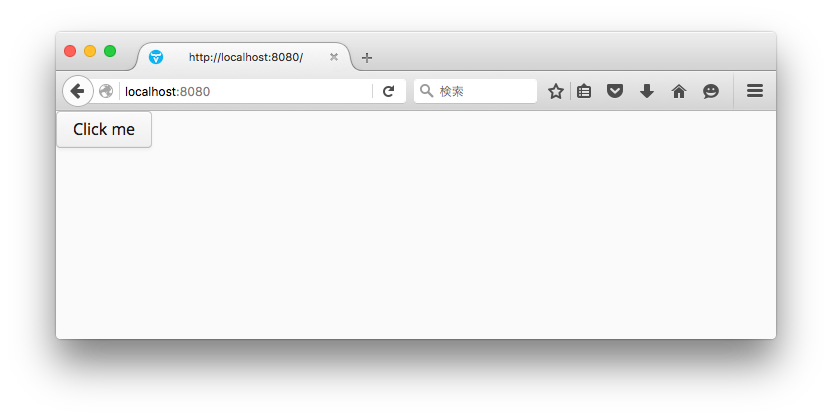
ボタンのクリックで Notification が表示される。
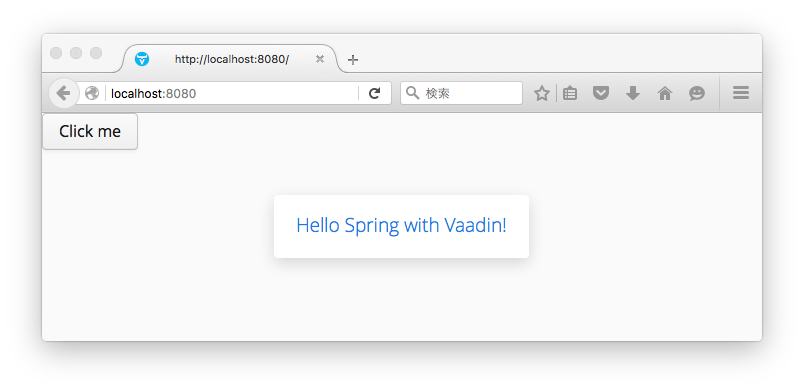
簡単ですね。
次回Spring Boot with Vaadin 〜その2〜ではJPAとGridを。

- 作者: Jaroslav Holan,Ondrej Kvasnovsky
- 出版社/メーカー: Packt Publishing
- 発売日: 2013/04/25
- メディア: Kindle版
- この商品を含むブログを見る